- Home
- Betting apps
- YesPlay
YesPlay App Review South Africa
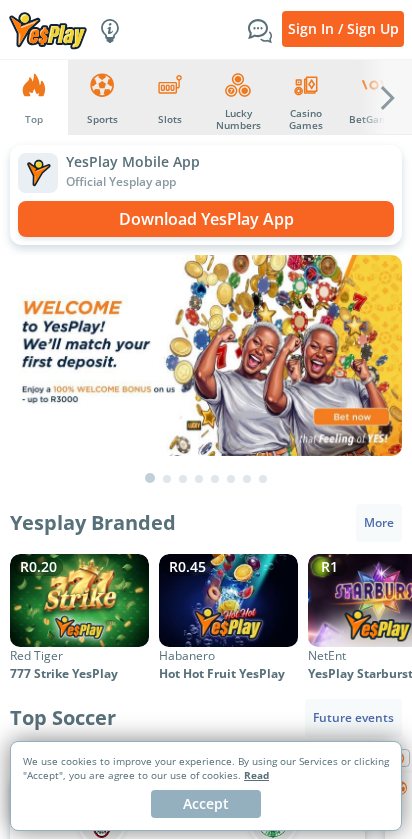
YesPlay offers an Android APK, an iPhone app and a Huawei AppGallery version. Its mobile home splits sports, slots, lucky numbers and BetGames into their own tabs. The themed slots filters and the separate BetGames Low Data section stand out if you spend more time on games than on match betting.
- Independent review
- 18+ only
How to get the YesPlay Android app
- Find the orange Download YesPlay App banner on the mobile home page. Use the Android option for the APK, or choose AppGallery on a compatible Huawei phone.
- Open the file from your Downloads and tap Install. If your phone asks for permission to install from that source, enable it for the app that opened the file and switch it off after setup.
On a phone that can’t install the APK, keep using the browser. The Sports and Slots tabs are already on the mobile page.
How to get the YesPlay iOS app
- Follow YesPlay’s iPhone option to the South African App Store. Check that the listing is YesPlay: Live Casino and Slots from SA Sportsbook (Pty) Ltd.
- Tap Get, open the installed app and use the account you already have.
If the listing is unavailable on your iPhone, open the mobile site in Safari.
YesPlay mobile app review
The first decision on YesPlay is what you want to play. Top is the mixed home feed, while Sports, Slots, Lucky Numbers and BetGames take you directly into those products. In the slots lobby, keep scrolling through the category strip to find more specific filters than the first few on screen.
Look for BetGames Low Data when you’re saving mobile data and want to browse the lighter game selection. That section still needs an internet connection. If you open a wallet or bank prompt on the same phone, finish it in the official app and keep the approval code private.
YesPlay app vs mobile site
Start in the browser if you’re checking whether YesPlay has a game you like. Its mobile slots and sportsbook pages are browsable before you sign in, so you can see the categories and match prices first. Install the app if you already use YesPlay regularly and want to launch it directly from your home screen.
Mobile registration and login
Tap the combined Sign In / Sign Up button at the top of the mobile page. Pick the sign-in option if you already have a YesPlay account, and complete the mobile registration prompts if this is your first visit. Return to the lobby tab you want once you’re signed in, especially if you started from a slot tile. See the YesPlay sign-up guide for the account setup.
YesPlay mobile casino
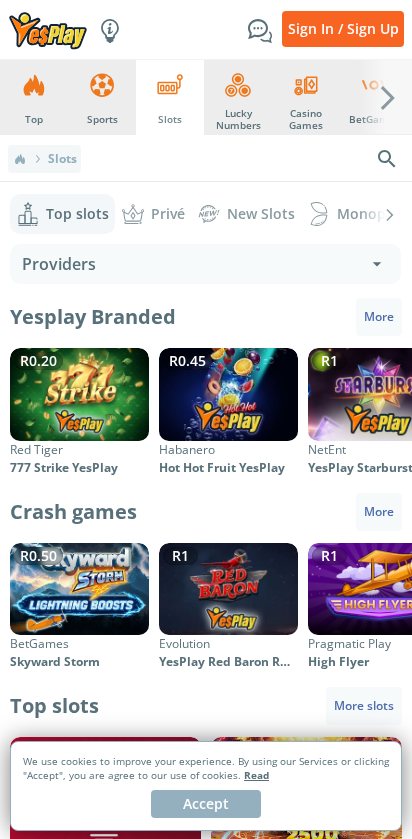
Tap Slots for the reels catalogue or Casino Games and BetGames for their own selections. Inside Slots, New Slots, Privé, Monopoly and Megaways give you more specific starting points than the general Top slots feed. Look under YesPlay Branded for titles such as YesPlay Starburst and Red Tiger 777 Strike YesPlay.
The tiles show game art and the provider, which helps when several titles look alike. If you open a game from a Buy spins or Free spins filter, read the in-game stake and feature price separately. A feature purchase can have a different price from the regular spin shown in the game.
YesPlay mobile sportsbook
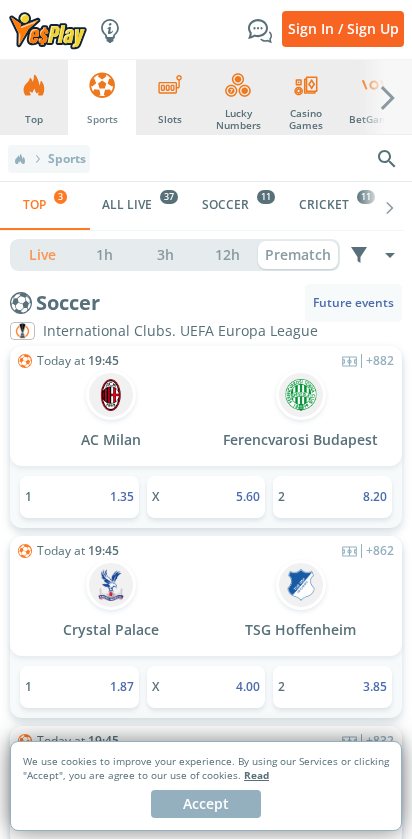
Go to Sports, then choose All Live or a sport such as soccer, cricket, tennis, basketball or rugby. You can read prices before signing in. For a league with many fixtures, choose the sport first so you spend less time scrolling past other events.
Tap a fixture for the full list of markets before picking an outcome. If you add selections from two matches, check whether the slip is showing them separately or as a multiple before entering a stake. YesPlay’s sportsbook is the place for match betting, while its draws are under Lucky Numbers.
Are mobile payments secure?
The mobile cashier gives you options that include cards, vouchers, Capitec Pay and Ozow, with supported wallet options depending on your device. If a deposit sends you to a bank or wallet prompt, read the amount before approving and check your balance when you return to YesPlay. Check the withdrawal requirements before depositing so you can have your verification details ready. Our YesPlay payment guide covers the available methods.
Troubleshooting and support
The best fix depends on whether you’re stuck at sign-in, in a game or at checkout. Start with the relevant part of the mobile page so you can check what happened before retrying.
- Sign-up keeps going back to sign-in. Use the combined account button and select the new-account option. If you already registered, use the recovery flow for the original account.
- Game stalls on mobile data. Return to the lobby and try BetGames Low Data or switch to Wi-Fi. If the game stopped during a paid round, check your balance and game history first.
- Payment approved but balance hasn’t moved. Save the approval reference and check the cashier history. Use the support menu if the transaction needs tracing.
📌 Some advice. Use the filter for the game type first, then check the tile’s provider before opening a title that has several editions.
YesPlay app rating for finding slots by type
YesPlay earns 5.5/10 for a slots lobby that gives you practical filters like Megaways, Privé and Buy spins. The separate BetGames Low Data section adds another useful route when the connection is limited. If you mostly follow sports, the simpler sport tabs and the All Live view are where you’ll spend more time.
FAQs
🍎 What is the YesPlay iPhone app called?
Look for YesPlay: Live Casino and Slots in the South African App Store and check that the publisher is SA Sportsbook (Pty) Ltd.
📊 Where are the live sports markets?
Tap Sports, then All Live to view in-play events across the available sports.
🎲 Can I play BetGames on a smaller data bundle?
YesPlay lists a BetGames Low Data category. Open it from BetGames and check what is available before starting a video session.