- Home
- Betting apps
- Lucky Fish
Lucky Fish App Review South Africa
Lucky Fish has an Android APK, a Huawei AppGallery version and an iPhone app called Lucky Fish SA. The mobile site puts slots and live dealer games alongside football, horse racing and lucky numbers. The yellow Bet Slip button and Next Race shortcut make it easy to get back to your selections or see what’s about to start.
- Independent review
- 18+ only
How to get the Lucky Fish Android app
- From the Lucky Fish mobile site, open the app download page. Select the Android APK, or choose AppGallery if you use a compatible Huawei phone.
- Open the file when it finishes downloading. If Android asks for permission, allow installs from the app you opened it with, tap Install and switch the permission off again.
If you normally install through Google Play, use Lucky Fish in Chrome. The casino and sports rows are already accessible from the browser.
How to get the Lucky Fish iOS app
- Search the South African App Store for Lucky Fish SA, or follow the iPhone option from the Lucky Fish download page.
- Check the compatibility details, tap Get and wait for the app to appear on your home screen.
Use the mobile site in Safari if your iPhone is below the version required by the App Store listing.
Lucky Fish mobile app review
The mobile home separates games and betting into two swipeable rows. Gaming Hub, Slot Games and Aviator sit above Soccer, Horse Racing and Lucky Numbers. The bottom row keeps the yellow Bet Slip button beside My Bets and Live Chat, so those tools are easy to spot.
You need a connection for current markets, games and your account. Switch to Wi-Fi before watching a racing stream or spending time in live dealer games on a limited bundle. If you change phones or lose access to your number, use the account recovery shortcut at the top of the mobile page.
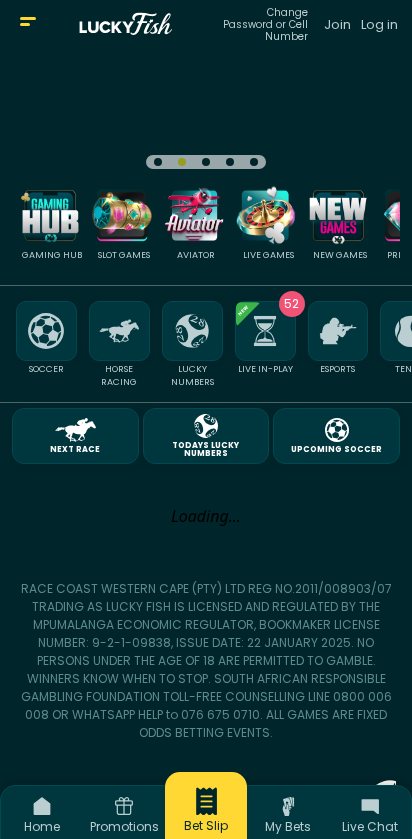
Lucky Fish app vs mobile site
Use the mobile site to check the next race or browse the slots categories before installing. The browser homepage already puts the slip, bet history and chat on the bottom row. The app is convenient if you come back often and want a dedicated icon for those trips.
Mobile registration and login
Choose Join for a new account or Log in if you’ve already registered. Lucky Fish checks your South African ID number during signup and may ask for documents if the check can’t verify it. The Change Password or Cell Number shortcut is beside the sign-in link if you need to recover access. See the Lucky Fish sign-up guide for the account setup.
Lucky Fish mobile casino
Choose Gaming Hub to start broadly, Slot Games to go straight to the reels or Live Games for hosted tables. Swipe along the games row to find categories such as Privé Slots, Bingo and Scratch Cards. New Games is a quicker starting point if you only want to see recent additions.
Aviator has its own tile, while the wider Crash Games category lets you look for options such as JetX. Check the stake on the game screen after it opens, especially if you switch between a crash game and a slot. Go back to the lobby when you want to change categories.
Lucky Fish mobile sportsbook
For racing, tap Next Race to open the upcoming event, or tap Horse Racing when you want to browse meetings. Lucky Fish covers local and international cards, so check the venue and race number before selecting a runner. Upcoming Soccer provides a similarly direct route to football fixtures.
The sports row also gives you Live In-Play, esports, rugby, cricket and tennis. Use Bet Builder on eligible events if you want selections from the same match. Before confirming, open the yellow Bet Slip to check each selection and its price.
Are mobile payments secure?
Lucky Fish offers EFT routes including Ozow and Capitec Pay, as well as voucher options. Use the cashier on your signed-in account, check the amount when approving it in your bank app and keep the transaction reference. Make sure your identity and payout details are verified before requesting a withdrawal. Our Lucky Fish payment guide covers the available methods.
Troubleshooting and support
Lucky Fish keeps its main help controls visible on the homepage. Use the recovery link for an account issue and the bottom Live Chat shortcut when you need help with a bet or payment.
- Lost access to your old number. Open Change Password or Cell Number and follow the recovery steps. Keep your existing account details handy for verification.
- Race list or game stalls. Switch to a stable connection and reload the section. Open My Bets or check your game balance first if you had already confirmed a stake.
- Cashier needs more information. Check whether Lucky Fish needs proof of identity or account ownership. Use Live Chat to confirm which document is missing.
📌 Some advice. Choose Horse Racing if you’re following a particular meeting. Next Race is for whichever event is due up next.
Lucky Fish app rating for quick access to games and racecards
Lucky Fish earns 5.5/10 for a mobile home with direct links to games, the next race and your slip. Its two rows make it easy to switch between casino and sports, though you’ll need to swipe to find categories farther along. The browser also works well if you only drop in for a meeting or a few football prices.
FAQs
📲 Where can I download Lucky Fish for Android?
Use the APK link on the official Lucky Fish site or look for its Huawei AppGallery listing.
🍎 What is the Lucky Fish iPhone app called?
Search for Lucky Fish SA in the South African App Store and check the listing’s compatibility details.
🏇 Where do I find the racecards?
Tap Horse Racing in the mobile sports row and open the meeting you want.
🎮 Where are the crash games?
Tap Aviator for that game, or open Crash Games to browse the wider selection.