- Home
- Betting apps
- Scorebet
Scorebet App Review South Africa
Scorebet has an Android app and a mobile site you can open on Android or iPhone. You can bet on football, horse racing and Lucky Numbers, or switch to slots, live tables and crash games. The bottom bar puts the Android download and live chat within easy reach.
- Independent review
- 18+ only
How to Get the Scorebet Android App
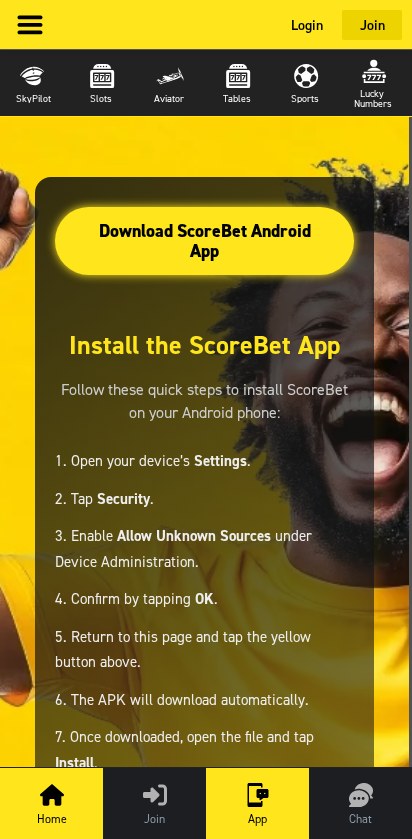
You can get the APK from Scorebet’s mobile site. The ScoreBet app on Google Play belongs to a different company and doesn’t work in South Africa. If you’d prefer to skip the download, open Scorebet in Chrome and use the same mobile site.
- Open Scorebet and tap App in the bottom bar.
- Tap Download ScoreBet Android App.
- Open Scorebet.apk from your browser’s downloads. If Android asks for permission to install from that browser, grant it for this download.
- Tap Install, then Open. Turn off the browser’s permission to install unknown apps when you finish.
How to Use Scorebet on iPhone
Scorebet has no iOS app in the South African App Store. So, to play on your phone, simply open the mobile site in Safari to reach the sportsbook and casino. If you want a home-screen shortcut, tap Share, choose Add to Home Screen, and tap Add.
Scorebet Mobile App Review
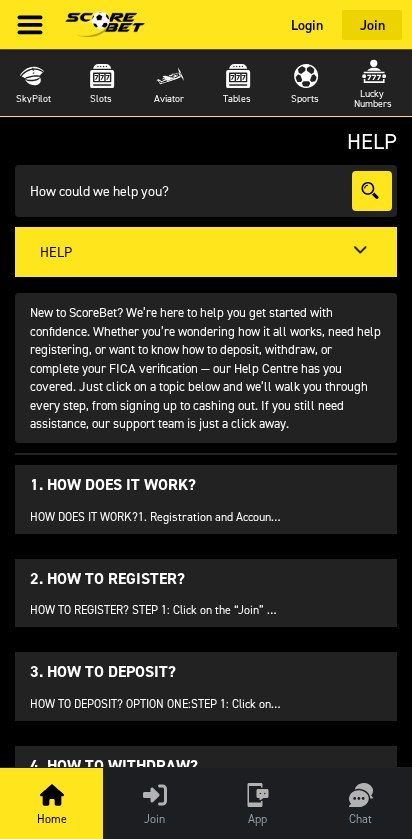
Scorebet’s Android app gives you a home-screen icon and a dedicated way to open your account. On the mobile site, the yellow top bar keeps Login and Join in view. The bottom bar keeps Home, Join, App and Chat together. The top game row gives you quick access to products such as SkyPilot, Slots, Aviator and Sports.
As we mentioned before, you use Scorebet’s APK and should keep Android’s security checks enabled. There’s no Scorebet data-free app, so budget for mobile data if you’re away from Wi-Fi. Browsing the fixture list is the simpler task on a weak connection, while live dealer video needs a steadier connection.
Scorebet App vs Mobile Site: Which Is Right for You?
Choose the Android APK if you want a dedicated launcher and are comfortable installing it yourself. Use the mobile site on iPhone, or on Android if you mainly check prices and want to skip installation. The browser already gives you the main sports and casino categories, the download tab, and live chat.
Registering and Logging In on Your Phone
Tap Join in the yellow top bar or the bottom menu to create an account. Returning customers can tap Login at the top to sign in. Follow our Scorebet registration guide for the form and FICA steps, or use the Scorebet login guide if you need to recover access.
Scorebet Mobile Casino
Tap Slots or Tables in the top game row to go straight to that category. The slots selection includes Pragmatic Play and EGT titles, and the casino offers Evolution live dealer tables. For quick access to crash games, use the separate Aviator and SkyPilot shortcuts.
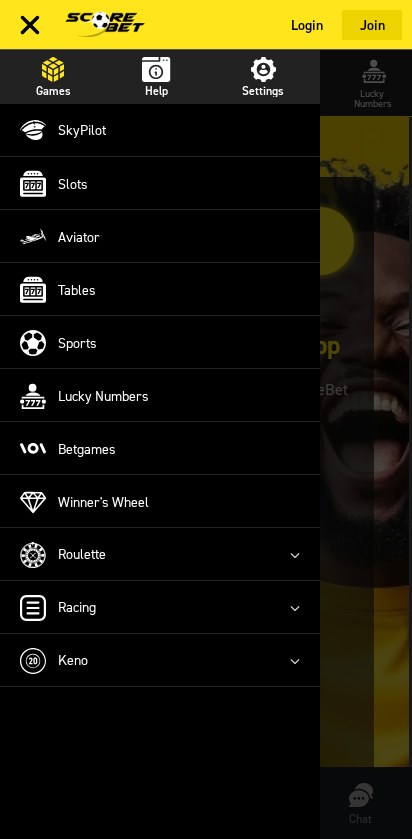
Open the top-left menu and choose Games to see more options, including Betgames, Roulette, Keno, and Winner’s Wheel. The mobile site keeps the games in separate categories, so you can go straight to a table or a draw without scrolling through the slots first.
Scorebet Mobile Sportsbook
Tap Sports in the game row, then choose Soccer, tennis, basketball, or another sport. For football, narrow the list with Today or Tomorrow and choose the competition you want. Use the Racing shortcut from the Games menu for horse racing.
Tap a fixture or the plus-number beside it for more markets. For example, if you want a goals bet instead of a match winner, open the fixture, choose a total and check the exact line before adding it to your slip. Scorebet supports singles, multiples and in-play betting, so check that the slip shows the bet type you intended.
Are Scorebet Mobile Payments Secure?
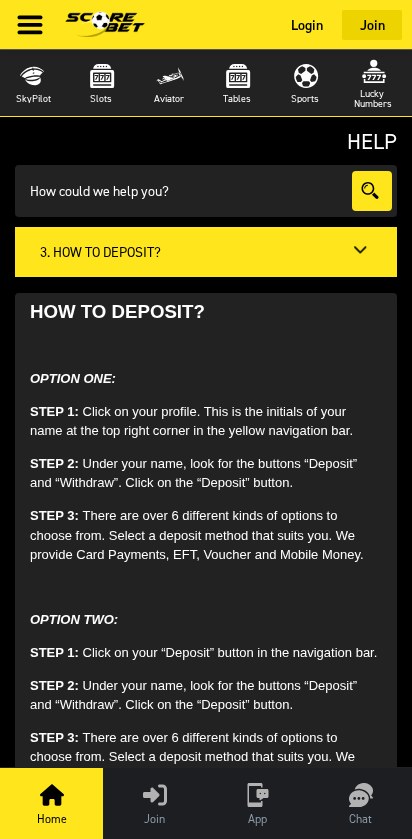
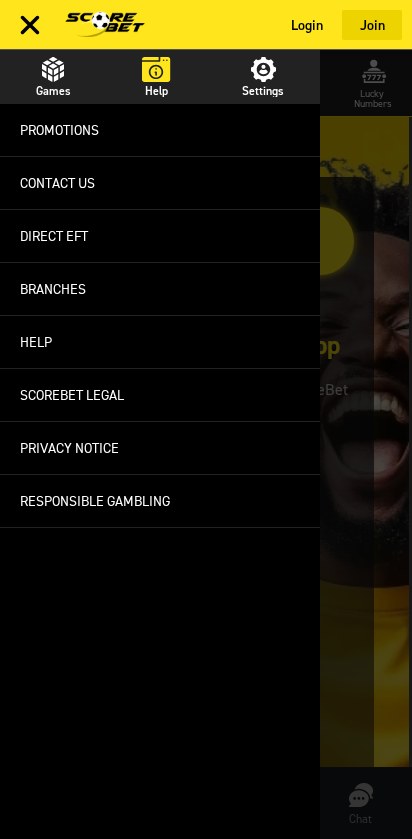
Sign in, tap your initials in the yellow bar, and choose Deposit or Withdraw. For Direct EFT, open Menu, Help, then Direct EFT for the current bank details and use your Scorebet user ID as the reference. Our Scorebet payment guide covers cards, EFT, vouchers and withdrawal options.
Troubleshooting Scorebet and Getting Mobile Support
Start with the shortcut that matches the problem. Scorebet’s mobile Help Centre covers registration, deposits, withdrawals and FICA. For account-specific problems, use Chat in the bottom bar.
- The APK won’t download. Tap App again and wait for the yellow button to load. Use the mobile site if the download still won’t start.
- Football fixtures aren’t loading. Return to Sports and reopen Soccer. If the list stays blank, refresh once or switch to a steadier connection.
- Your EFT is missing. Check your proof of payment for the user ID reference. Keep the receipt and use Chat so support can trace the transfer.
📌 Some advice. For a login problem, use the account recovery option or contact support. You don’t have to create another account.
The Bottom Line: Fast Shortcuts to Games and Help
Overall app and usability rating: 5.5/10. Scorebet is easiest to use when you know which shortcut you want, from App and Chat to Sports and Aviator. The browser is the practical choice for iPhone users, while Android users can install the APK if they want a dedicated icon.
Scorebet App FAQs
🍎 How do I use Scorebet on iPhone?
Open Scorebet in Safari. Use Share and Add to Home Screen if you want a shortcut.
⚽ Where are the football markets?
Tap Sports, choose Soccer and open the fixture. The number next to a match shows how many more markets you can open.
🏦 What reference should I use for Direct EFT?
Use your Scorebet user ID by itself. Open the menu, choose Help and then Direct EFT for the current bank details.
18+ only. Gamble responsibly.